- contact@insightcontractsai.com
The platform
Everything a contract matter needs, in one place
From the business’s request to the decision record, and on to renewals and obligations. Each capability below is in the product today, shown on the demo company’s data.
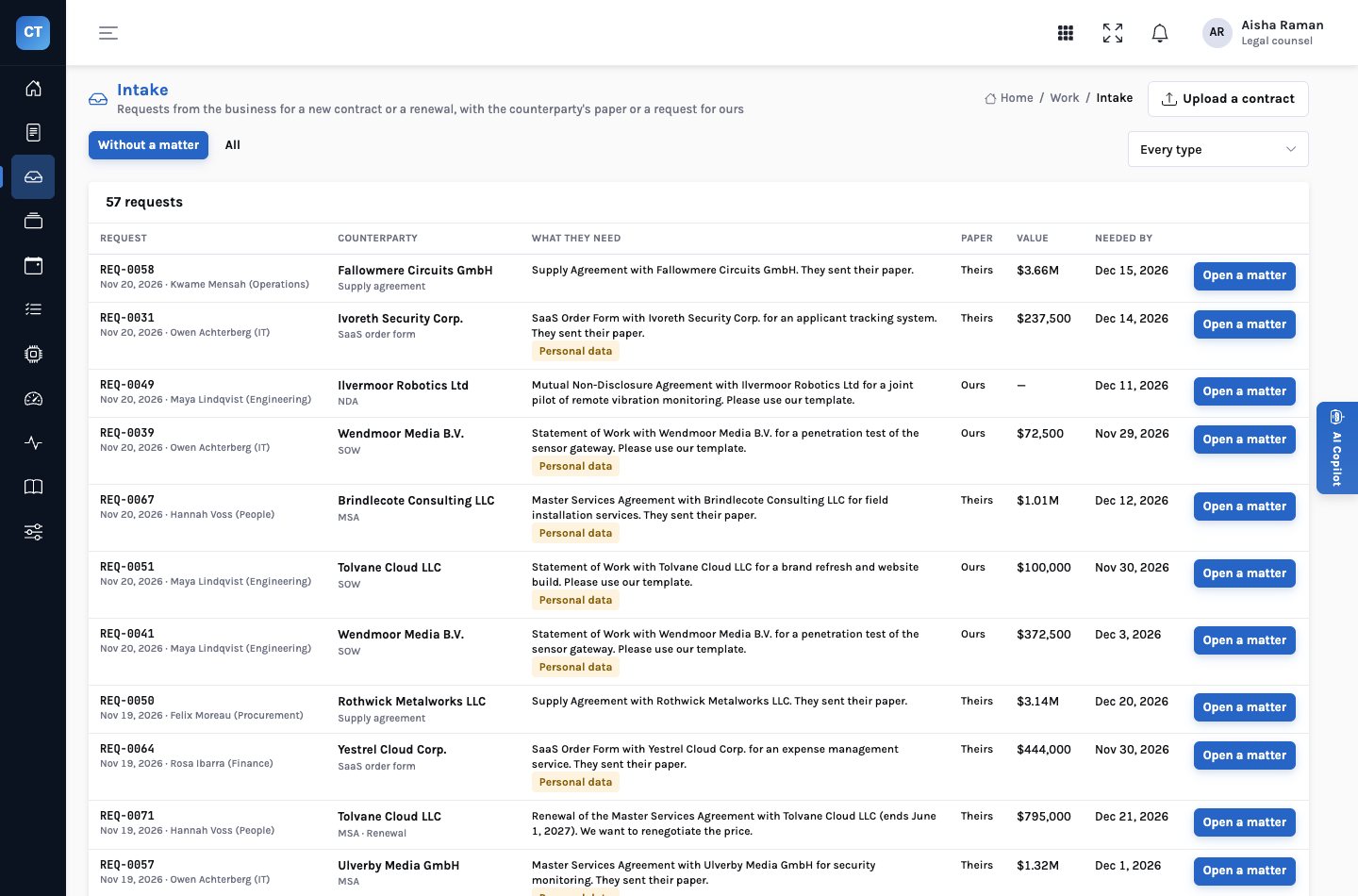
Intake
Every request from the business, with what is missing
The intake queue holds what the business asked for: the contract type, the counterparty, whether it is their paper or ours, whether the counterparty will process personal data, the value and the date it is needed. Opening a matter brings the drafts with it, or a draft is uploaded as PDF or Word.
- From your intake system — requests are read from the company’s systems, never changed there
- Their paper or ours — and the role the company plays: buyer, seller or a mutual NDA
- Personal data — declared on the request, and checked against the contract family
- What is missing — the intake agent lists missing exhibits, a missing DPA or a missing signed copy, and drafts the request
Clause reader
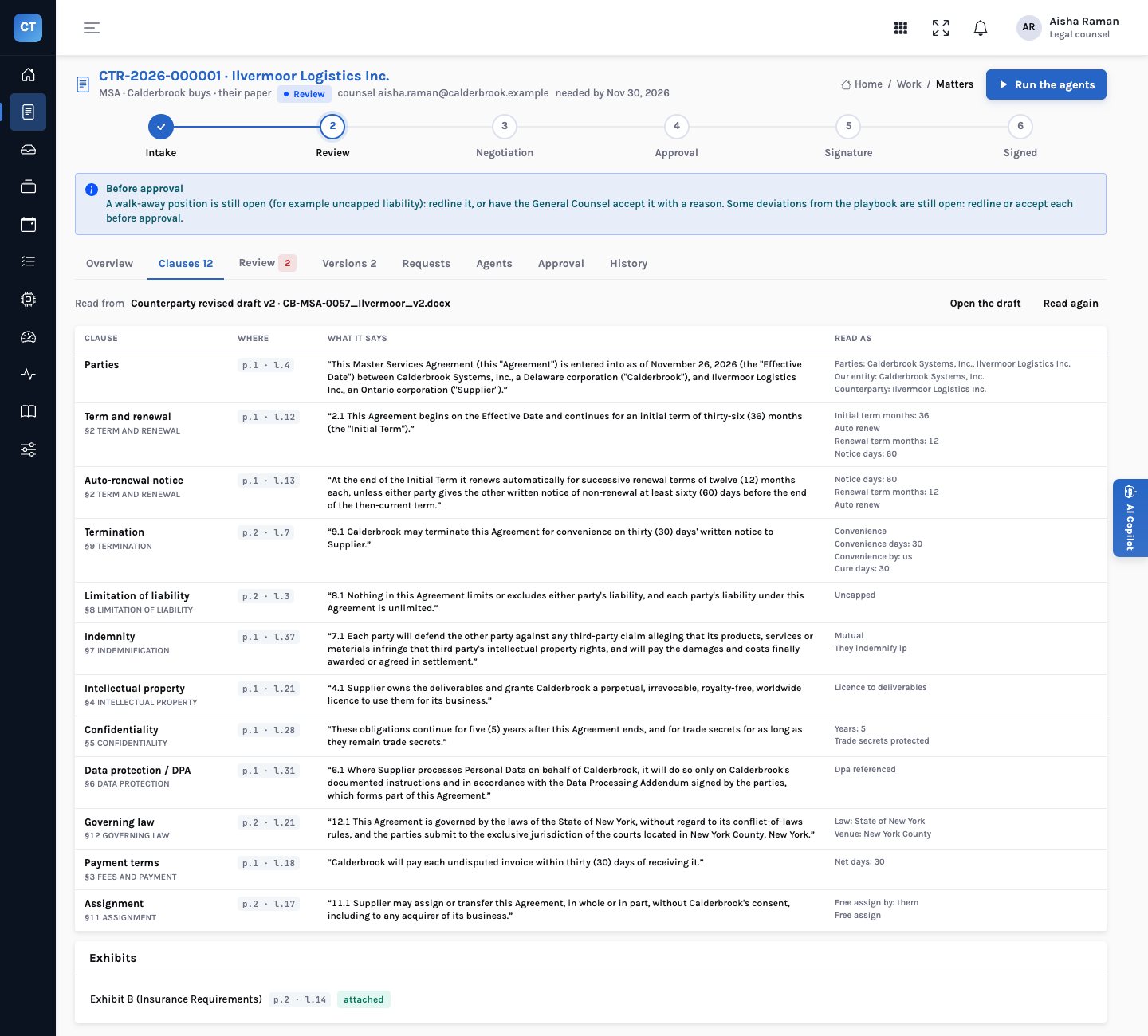
Twelve clause types, each quoted with its page and line
The reader turns a draft into its clauses: parties, term and renewal, the auto-renewal notice, termination, limitation of liability, indemnity, intellectual property, confidentiality, data protection, governing law, payment terms and assignment. Each is quoted with the page and line it came from, the same in the PDF, the Word file and the text layer, alongside the terms read from it.
- Deterministic — the reading is code, not a language model: the same draft reads the same way every time
- Never filled in — a clause the reader can’t find is reported missing for a lawyer to look at
- Exhibits and signatures — exhibits referenced against exhibits attached; each signature block read as signed or blank
- Scans refused plainly — a PDF with no text layer is turned away with a request for the original or the Word file
Playbook review
Every clause against your preferred and fallback positions
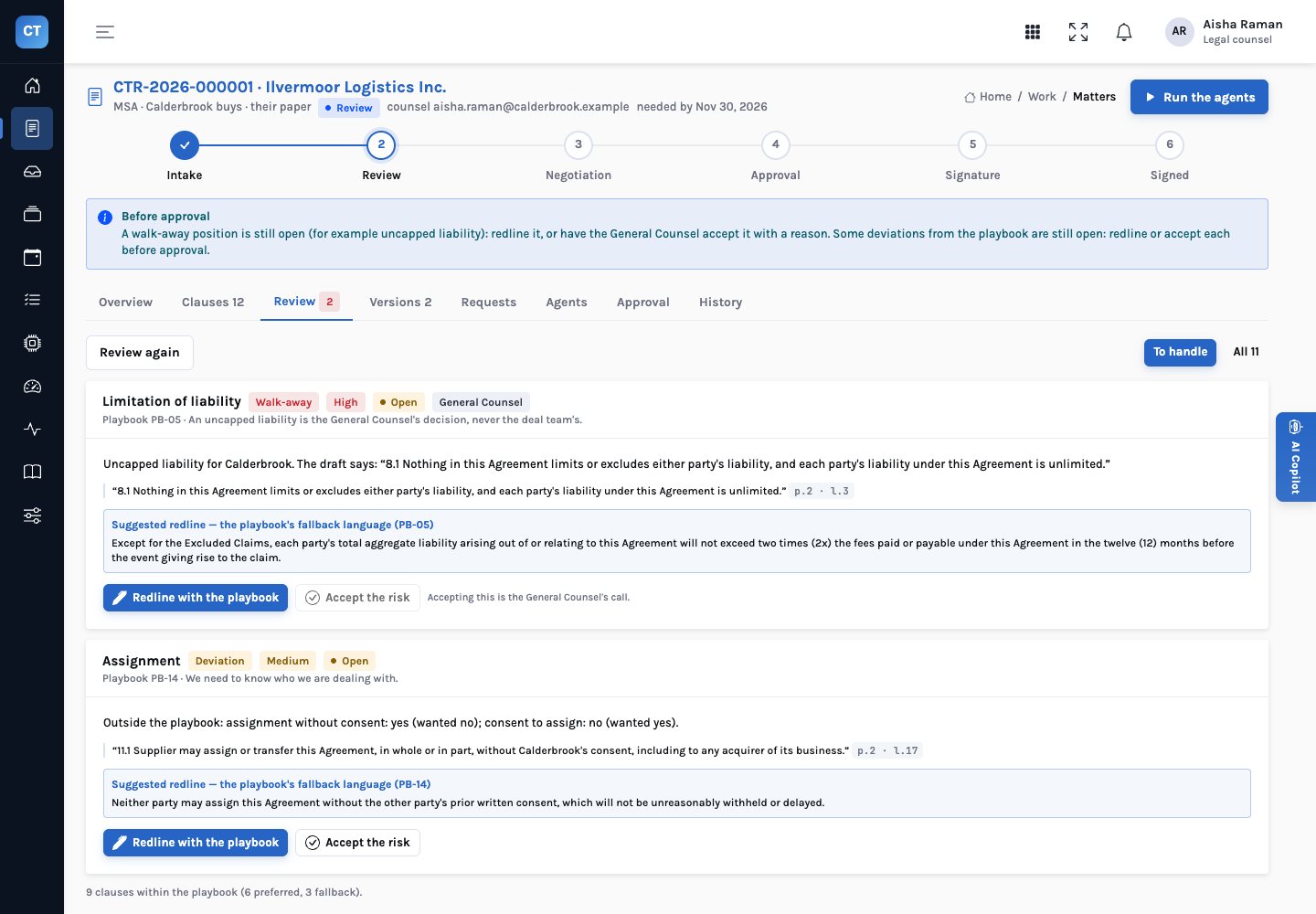
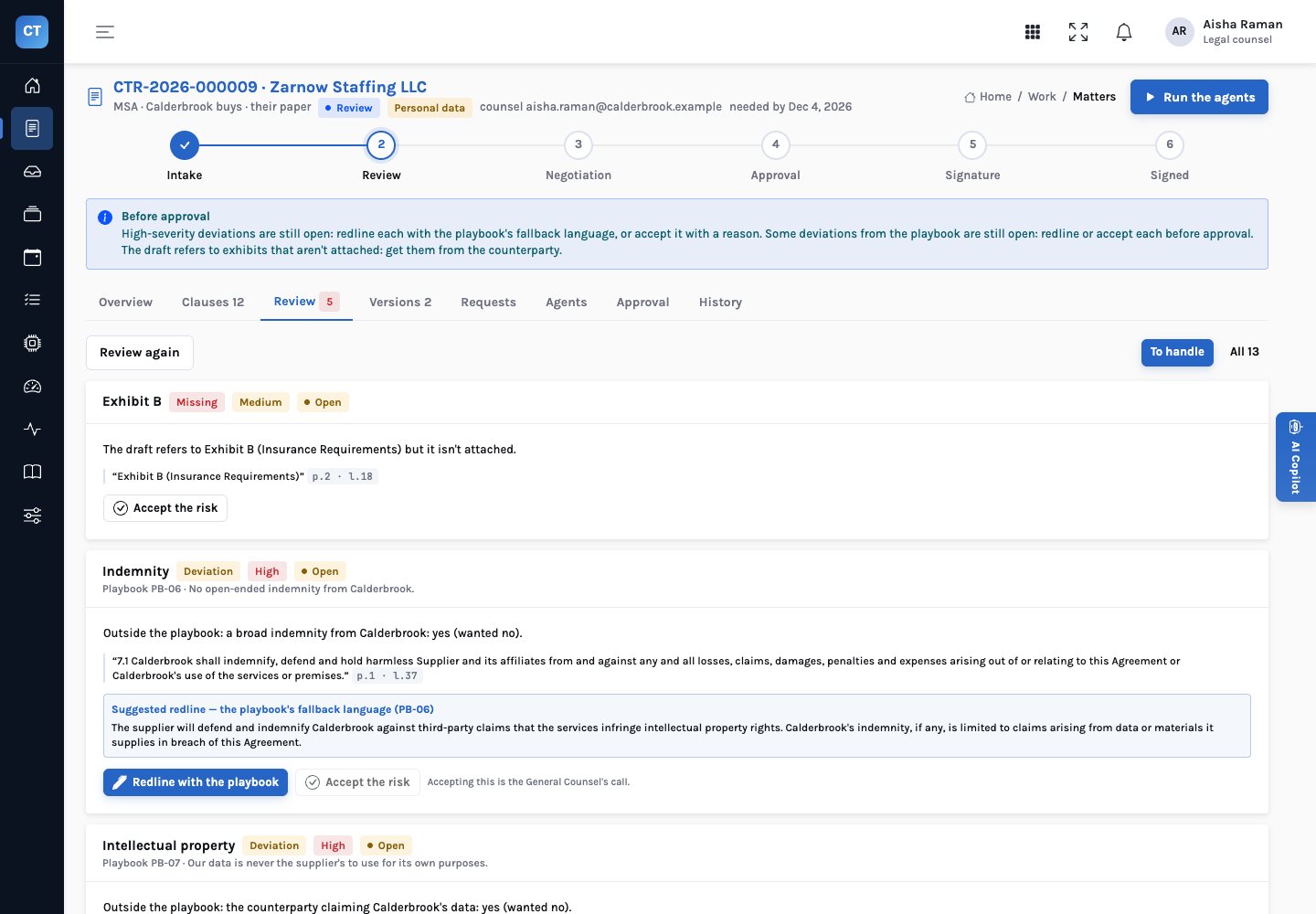
Each clause is compared with the playbook row for its contract type and the company’s role. It is preferred, within the fallback, a deviation, a walk-away position, or missing. The severity and the approver come from the playbook, and the suggested redline is the playbook’s own fallback language, copied verbatim.
- Five positions — preferred, fallback, deviation, walk-away and missing, with the constraint each clause misses
- Severity from the playbook — high, medium or low, and who may accept the deviation: the counsel or the General Counsel
- Redline = fallback text — never written by a model; if the playbook has no fallback, the review says so
- Resolve with a reason — redline it, or accept the risk with a reason that goes on the decision record
Cross-document checks
The gaps a clause-by-clause read misses
Some of the most expensive problems are not in any one clause. The review reads the draft against the rest of the contract family and raises what it finds as findings of their own, with the evidence quoted.
- Personal data without a DPA — none attached, none on the matter and none signed under the parent agreement
- Assignment conflicts — the draft allows assignment without consent; the parent agreement requires it, quoted with page and line
- Missing exhibits — an exhibit referenced in the draft and not attached
- Unsigned amendments — in the repository: an amendment in force on the register with a blank signature block
Versions and redlines
What changed between drafts, clause by clause and word by word
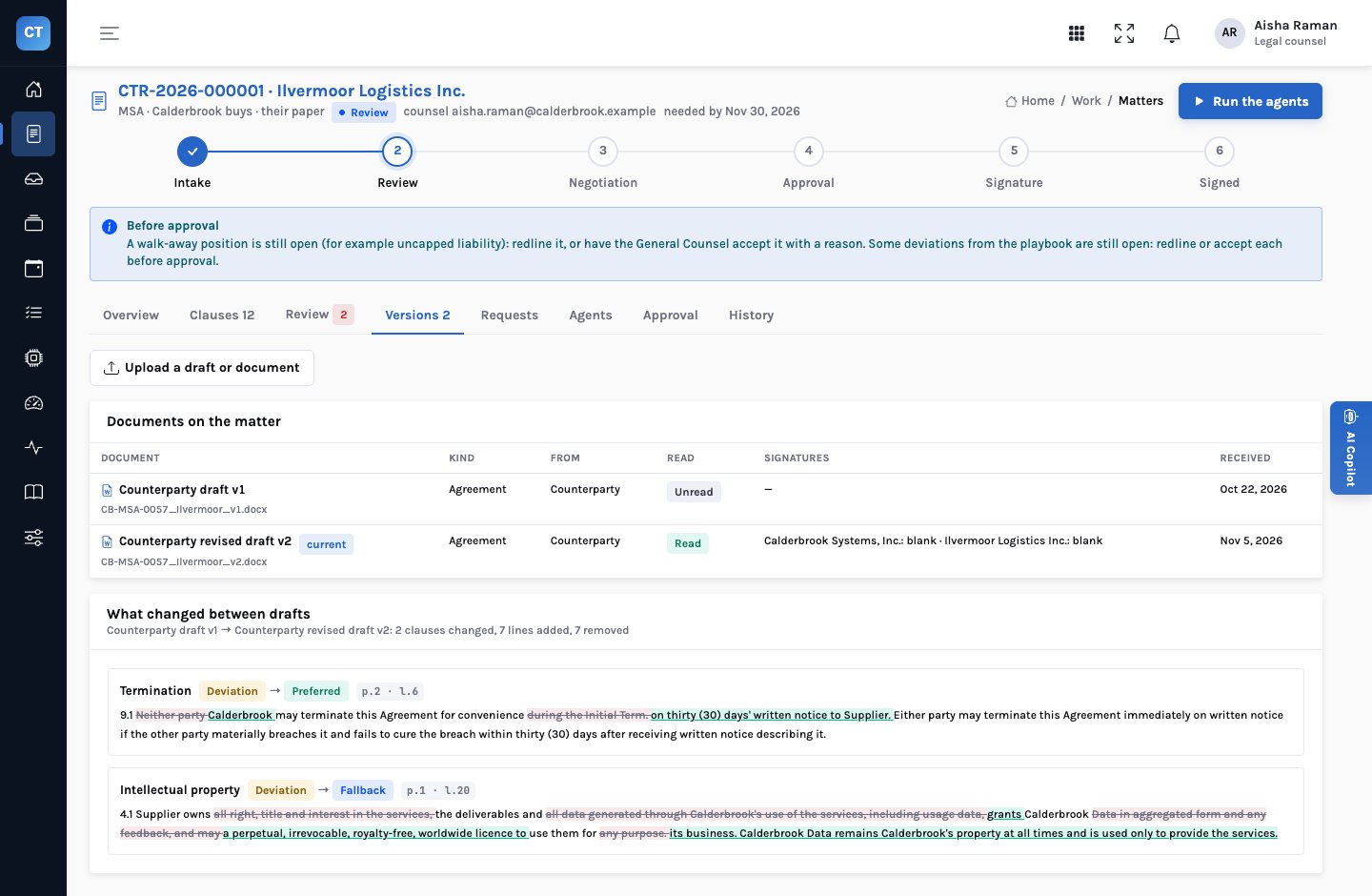
Every draft is kept as a version. When the counterparty sends a new one, it is read and reviewed at once and compared with the last: which clauses changed, the words removed and added, and the playbook position before and after. A redline the counterparty takes resolves its finding on the next draft; one it ignores is reopened.
- Clause by clause — changes grouped by clause, not a wall of tracked changes
- Position before and after — a deviation that became preferred, or a fallback that became a deviation
- Redlines tracked — a redlined finding stays open until the next draft comes back within the playbook
- Both formats — PDF and Word drafts compare on the same page and line numbers
Counterparty requests
Ask once, clearly, and read the answer when it arrives
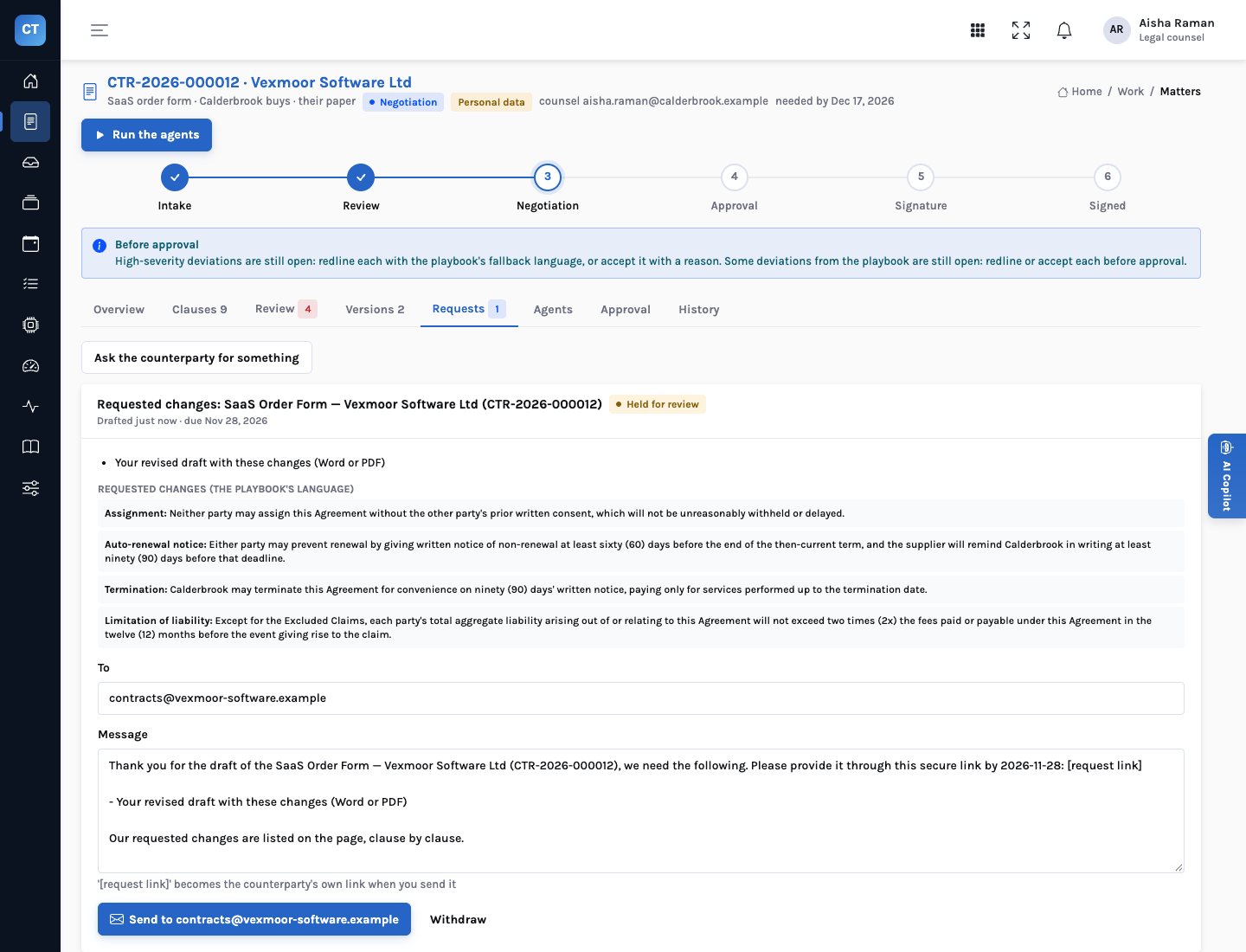
When something is missing or redlines are ready, an agent drafts the request; a counsel can write one too. Every request is held until a person sends it. The counterparty answers through a link with no login, and what it uploads is filed at once: a revised draft becomes the next version, read, reviewed and compared.
- Held for review — nothing reaches a counterparty without a person sending it
- A link per request — shown once when it is sent; only a fingerprint of it is kept
- Redlines on the page — the counterparty sees each requested change in the playbook’s words
- Read on arrival — the missing exhibit, the DPA, the signed copy or the revised draft
Approval routing
Controls that block or refer, and four eyes
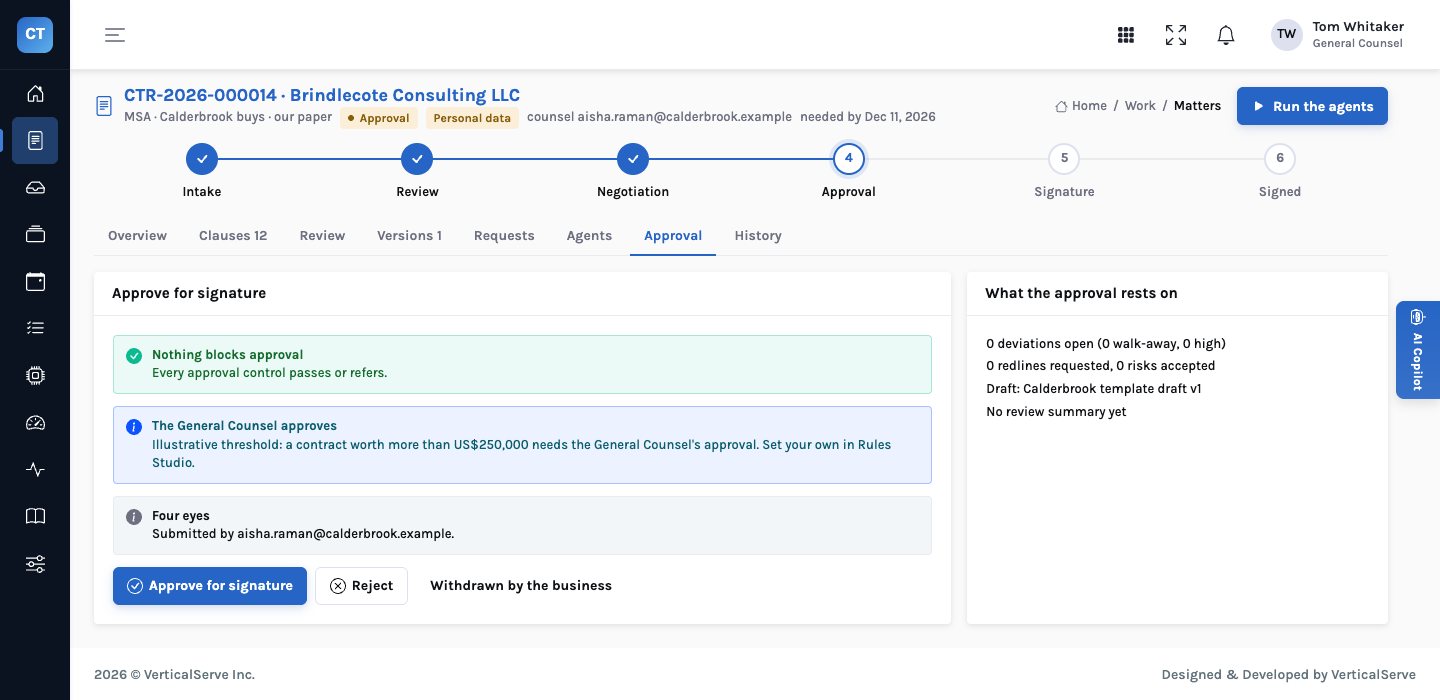
Approval controls from Rules Studio decide what blocks a matter and what goes to the General Counsel. The counsel submits; another person approves. The decision record keeps the draft and version, each control’s outcome, and every deviation’s position and resolution as they stood.
- Six that block — walk-away open, high-severity deviations open, any deviation open, personal data without a DPA, an assignment conflict, missing exhibits
- Four that refer — uncapped liability, a GC-reserved position accepted, governing law outside the playbook, and value above an illustrative US$250,000
- Four eyes — the approver is never the submitter, enforced by the system
- Reject needs a reason — and withdrawn by the business is its own outcome
Repository
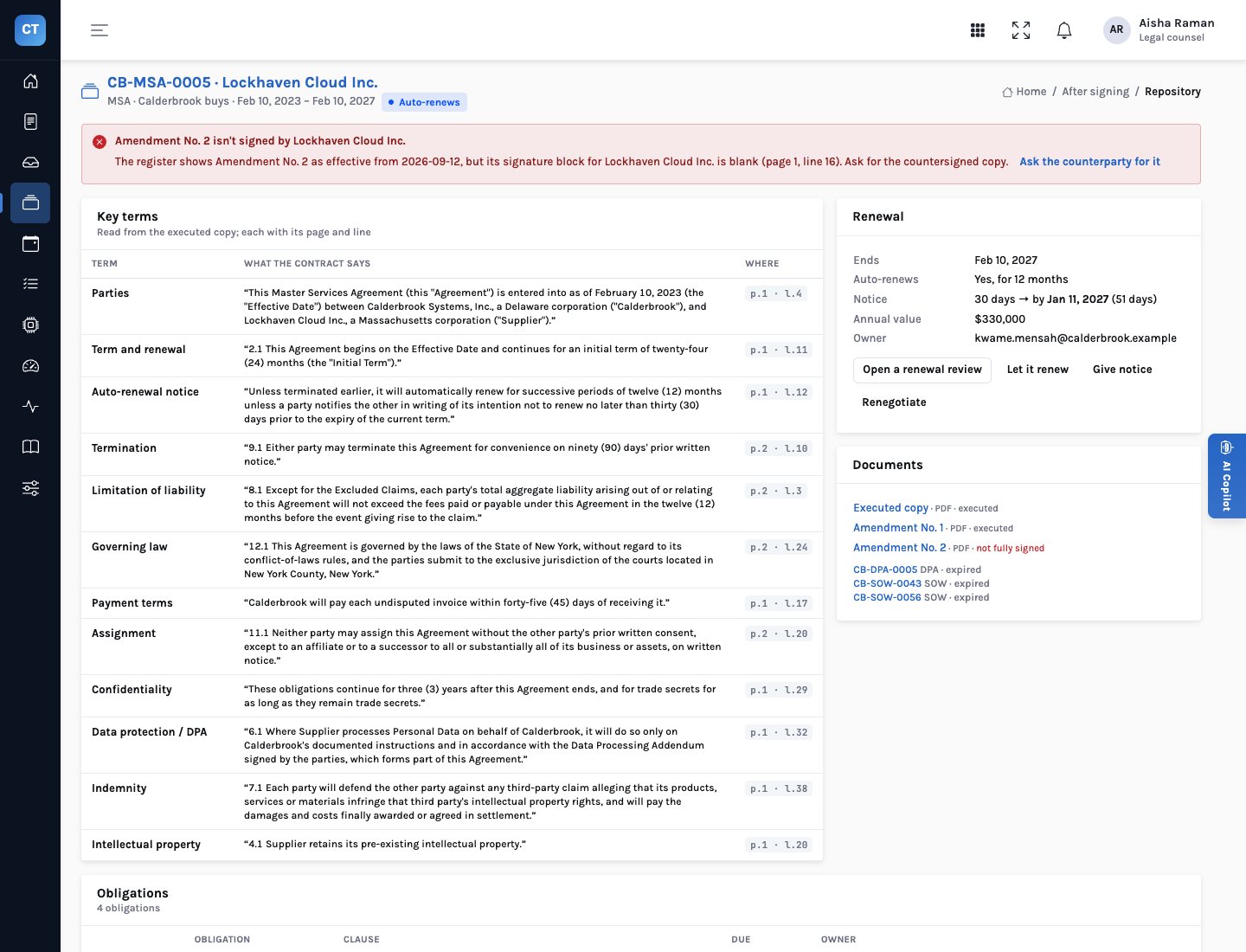
Key terms read from every executed copy
Every signed contract is read the same way as a draft, so the repository holds its key terms with page and line: the term, renewal and notice, liability, governing law, assignment and the rest. A matter signed in InsightContracts joins it the same way.
- From the executed copy — not from a form someone filled in after signing
- Flags — an amendment the register says is in force but the other side never signed
- Search — by title, counterparty or contract number, and by type and status
- Renewal decisions — renew, terminate or renegotiate, recorded with the person who decided
Renewals calendar
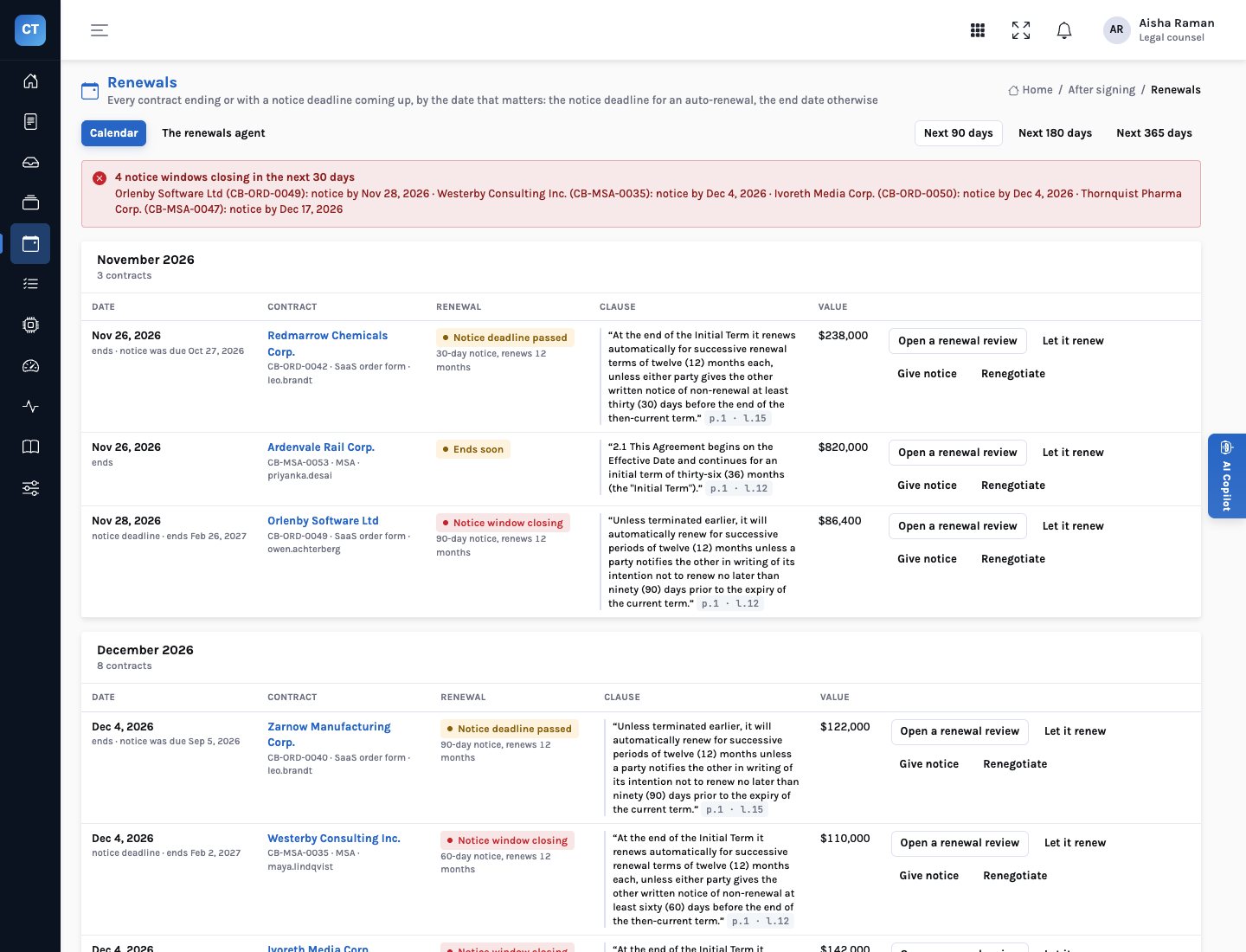
Sorted by the notice deadline, not the end date
For an auto-renewing contract the date that matters is the last day to give notice: the end of the current term less the notice period, both as the executed copy states them. The calendar shows which windows are closing, which have passed and which contracts simply end.
- Notice deadline — end of term less the notice period, read from the clause
- Window closing — flagged within thirty days of the deadline
- Renewals agent — prepares a renewal review for deadlines in the next forty-five days
- A person decides — let it renew, give notice, renegotiate, or open a renewal review
Obligations tracker
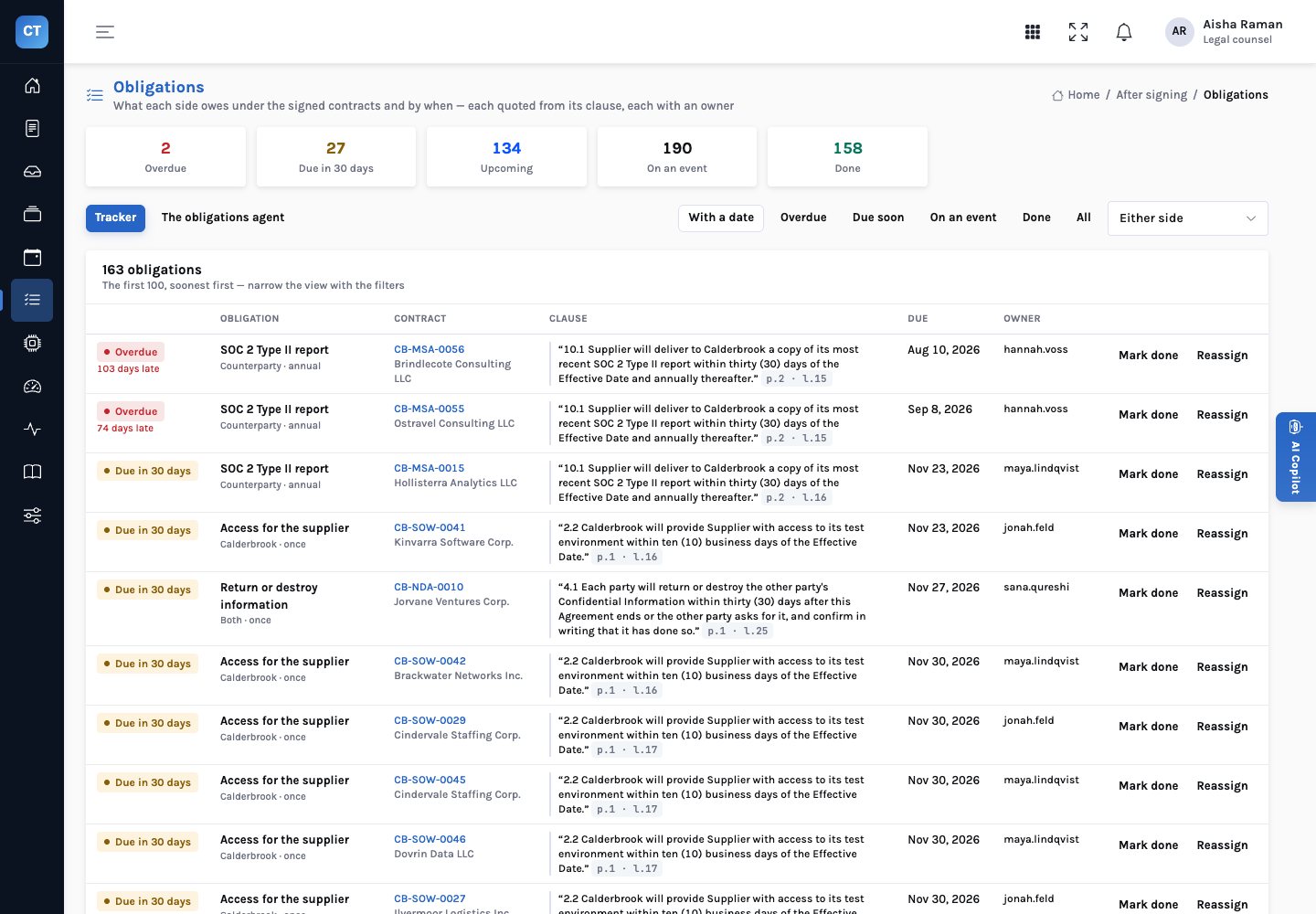
Who owes what, by when, quoted from the clause
Obligations are read from the executed copy: certificates and reports the supplier owes, access the company must provide, information to return or destroy at the end. Each has an owner, a due date and its recurrence, and the tracker shows what is overdue and due soon.
- Quoted — each obligation with the sentence, page and line it came from
- Recurring — once, annual, quarterly, or on an event
- Owned — people mark an obligation done with a note, or reassign it
- Obligations agent — prepares requests to counterparties for what they owe, held for a person
Rules Studio
Your approval policy, as rules you can read, test and publish
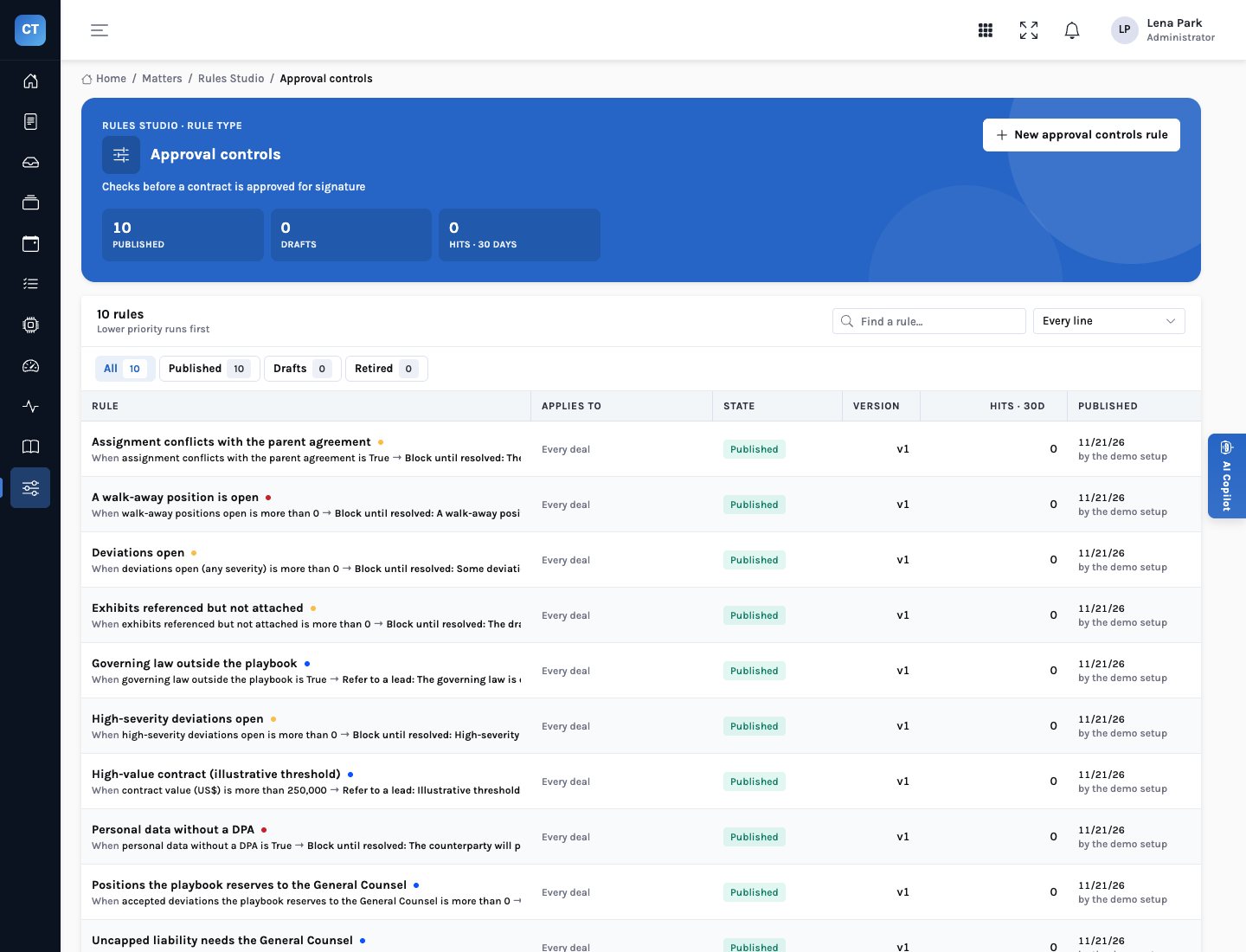
The approval controls are rules, not code. Legal operations can see exactly what blocks a matter and what refers it to the General Counsel, try a change against a real matter, and publish it with a record of who changed what. The playbook itself is data too.
- Ten controls — six that block approval, four that refer it to the General Counsel
- Test first — see what a change would have done to a real matter before anyone feels it
- Drafts and publishing — changes wait as drafts until published
- On the decision record — each control’s outcome and version is kept with the decision
Copilot
Ask about the matter in front of you
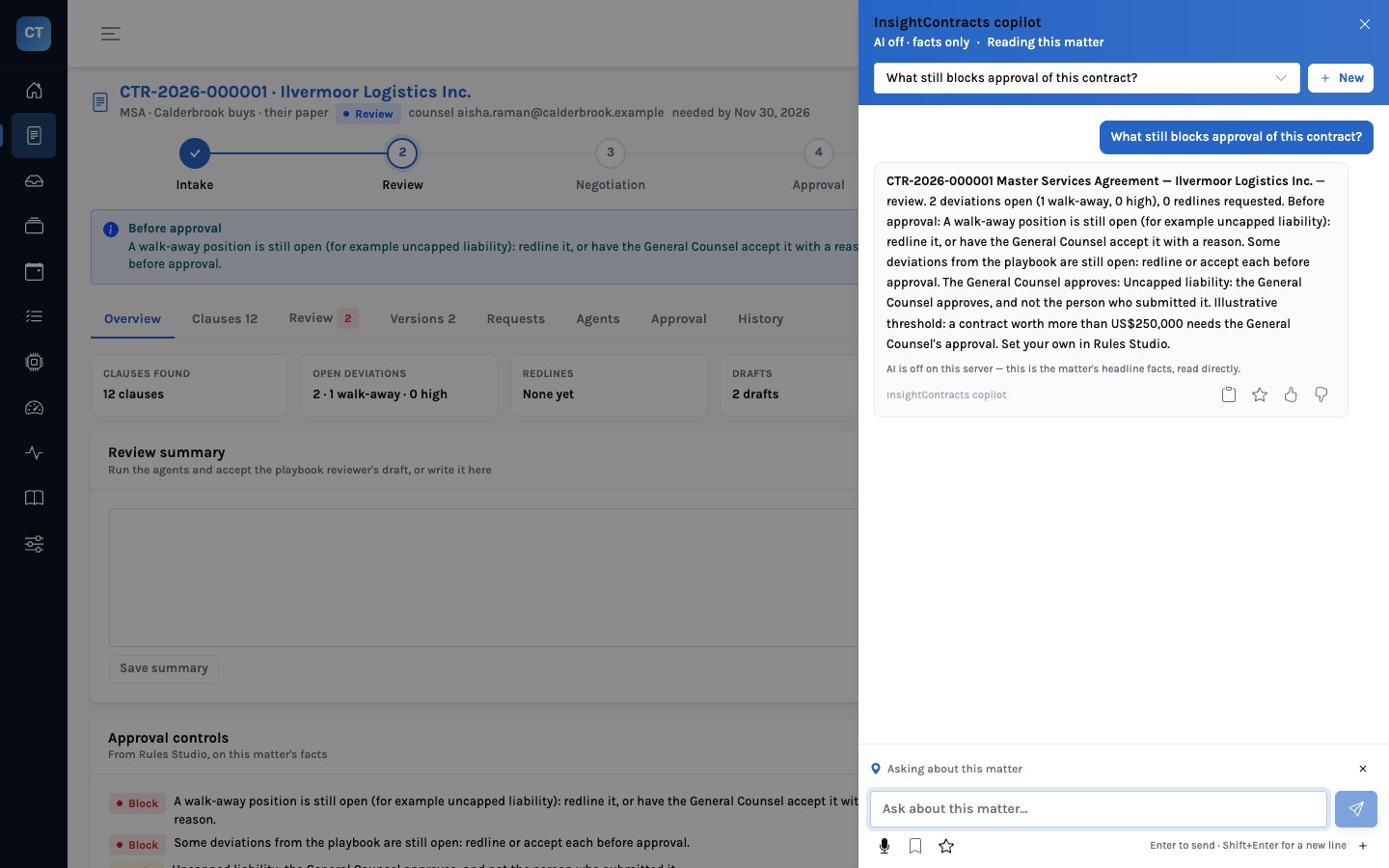
The copilot answers questions about the open matter with read-only tools: the summary, the clauses, the playbook review, the playbook positions, the versions and what changed, requests, what the agents did, obligations, renewals and a search of the repository. It reads; it never sends, signs, approves or changes anything.
- Grounded — answers come from the matter’s own facts, with the tab they came from
- Read-only — no tool changes a matter
- Model optional — with the model off it answers with the matter’s headline facts, and says so
- Beyond the matter — obligations, renewals and the repository