Two years after signing, a supplier claim lands and someone asks why the contract has no cap on liability. The useful answer isn’t “it was approved”. It is who approved it, whether they were allowed to, what the review said at the time, and whether the person who approved it was the same person who negotiated it. Approval routing, four eyes and a decision record are how a legal team answers that in a minute instead of a week.
In short
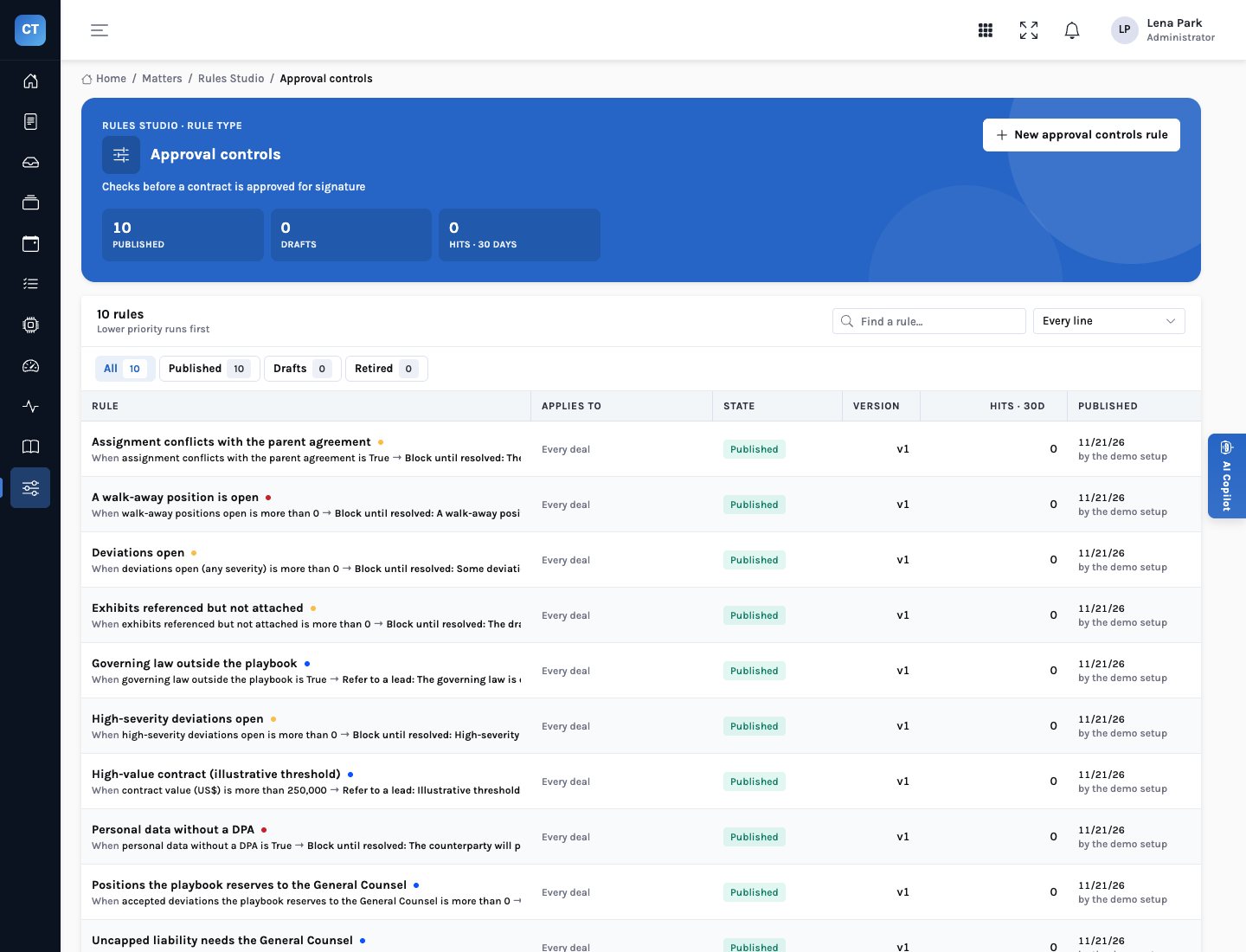
- Controls decide what blocks and what refers. InsightContracts ships ten approval controls in Rules Studio: six block approval outright, four refer the matter to the General Counsel.
- Four eyes is enforced, not remembered. The person who approves a contract for signature can never be the person who submitted it.
- The record is written at the moment of decision. Every control’s outcome and rule version, and every finding’s position, resolution, note and author, as they stood.
- Agents never approve. The supervisor agent prepares the submission and says what blocks it; approving is not an action any agent has.
Ten controls, two outcomes
Before a matter can be approved for signature, InsightContracts evaluates its approval controls on the matter’s facts: how many deviations are open, whether any is a walk-away, whether personal data is processed without a DPA, whether the draft conflicts with its parent agreement, whether exhibits are missing, whether liability is uncapped, the governing law, and the contract value. The controls are rules in Rules Studio, not code, so the legal team can read them, test a change against a live matter and publish it with a record of who changed what.
| Control | Outcome | Fires when |
|---|---|---|
| WALKAWAY_OPEN | Block | A walk-away position (for example uncapped liability) is still open |
| HIGH_DEVIATIONS | Block | A high-severity deviation is still open |
| DEVIATIONS_OPEN | Block | Any deviation from the playbook is still open, redlined or not |
| DPA_MISSING | Block | The counterparty will process personal data and no Data Processing Addendum is in place |
| ASSIGNMENT_CONFLICT | Block | The draft’s assignment clause conflicts with the parent agreement |
| EXHIBITS_MISSING | Block | The draft refers to exhibits that aren’t attached |
| UNCAPPED_LIABILITY_GC | Refer | Liability is uncapped in the draft: the General Counsel approves |
| GC_POSITIONS | Refer | A deviation the playbook reserves to the General Counsel was accepted |
| GOVERNING_LAW_GC | Refer | The governing law is outside the playbook |
| VALUE_GC | Refer | The contract is worth more than US$250,000 (an illustrative threshold; set your own) |
A blocking control stops approval until the issue is resolved: redlined and taken by the counterparty, accepted with a reason, or the missing document received. A referring control doesn’t stop anything; it changes who may approve. The matter header shows the blockers under “Before approval”, in the controls’ own sentences, so nobody discovers them by having the approve button fail.
Who may approve what
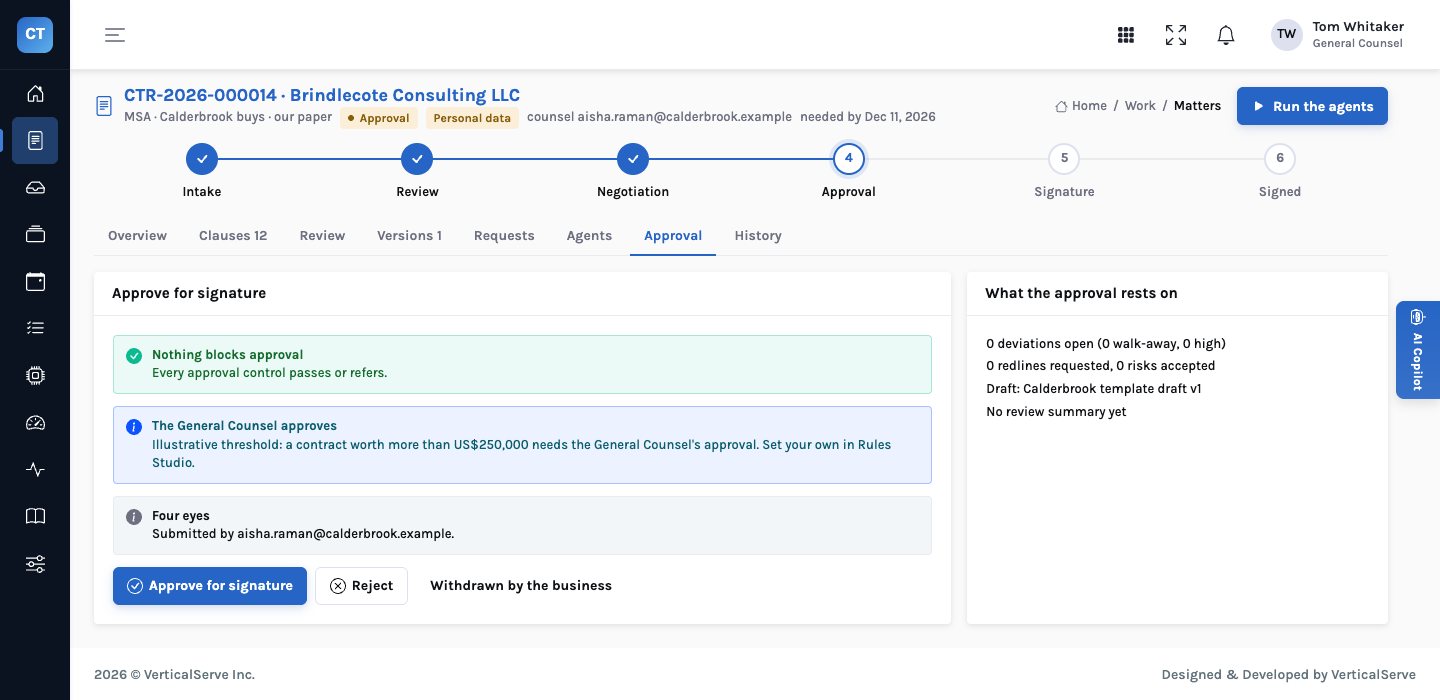
Submitting needs no blocker; approving needs a different person, and the General Counsel where a control refers.
The rules behind the diagram are enforced in the decision step itself, and they are checked again at the moment of approval rather than trusted from when the matter was submitted:
- No blocker. If anything changed since submission and a control now blocks, the approval is refused with the reason.
- Submitted first. A matter can’t be approved that nobody submitted.
- Four eyes. If the approver is the submitter, the answer is the person who approves can’t be the person who submitted it.
- Referral. If a control refers the matter, only the General Counsel (in the demo, a lead or administrator role) can approve it.
- Reasons. A rejection needs a written reason. Withdrawn by the business is its own outcome, not a rejection.
The decision record
When the approver decides, InsightContracts writes a decision record alongside the decision. It is a snapshot: whatever happens to the matter afterwards, the record says what was true when someone said yes or no.
| The record keeps | So that later you can answer |
|---|---|
| The verdict (approve, decline or withdraw), who decided and when, signed off as a human decision with the note | Who approved this, and what did they say? |
| Who submitted it | Was the approver someone other than the person who negotiated it? |
| Every approval control’s outcome and reason, with the rule code and version | Was anything referred, and did the right person approve it? |
| Every finding that wasn’t preferred: clause, position, severity, resolution, note and who resolved it | Which risks were accepted, by whom, and why? |
| The draft’s file name and version number | Which draft was approved? |
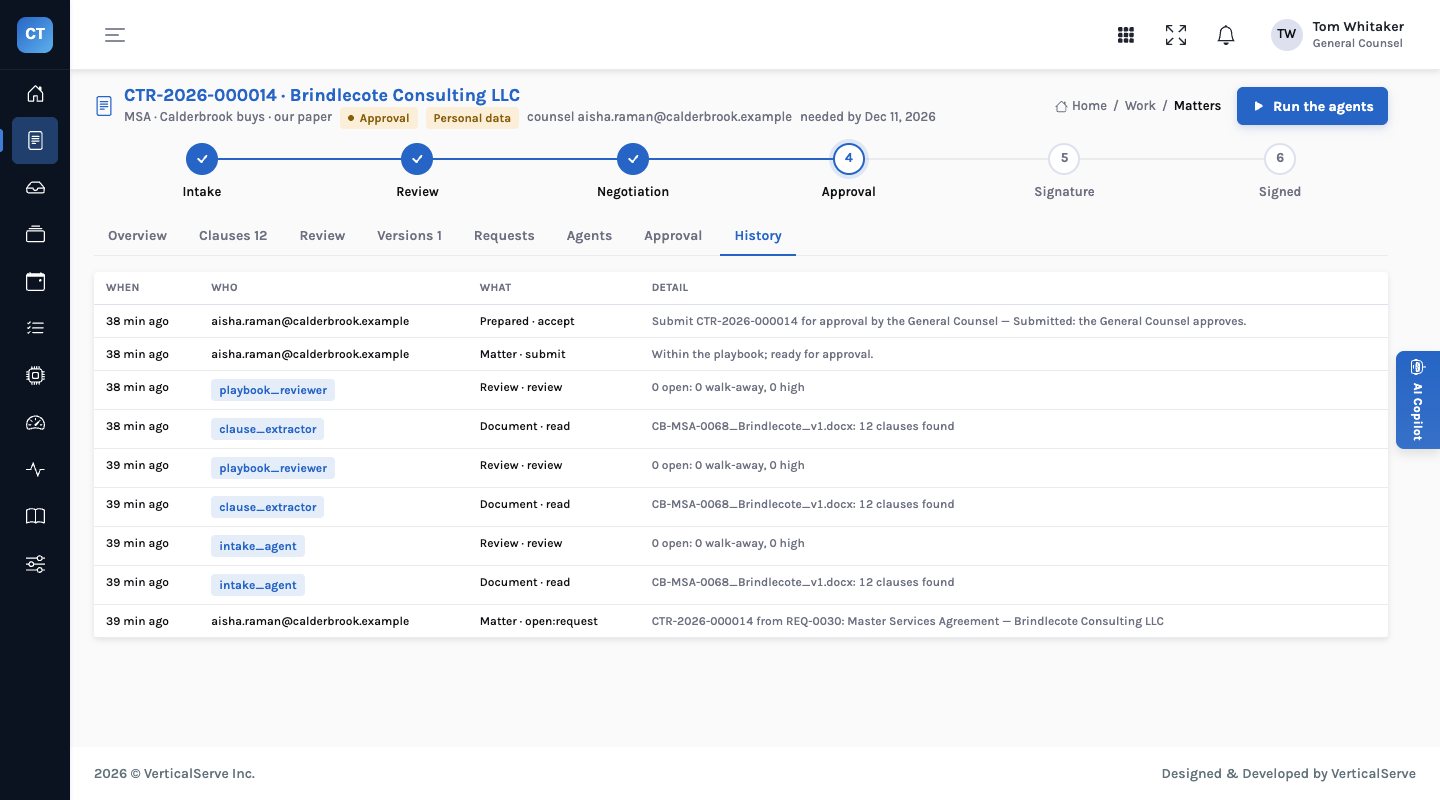
The matter’s history keeps the steps around it: who opened the matter from which intake request, which agent read and reviewed which draft, who submitted, who accepted a prepared decision.
The clause extractor reads the draft; the playbook reviewer gives every clause a position; the redline drafter proposes fallback language.
Redline what should be redlined; accept what can be accepted, with a reason; ask the counterparty for missing documents.
A high-severity or walk-away deviation, or one the playbook reserves to the General Counsel. Doing so also refers the matter (GC_POSITIONS).
Often by accepting the supervisor agent’s prepared submission, which says who must approve.
The controls run again; the decision record is written with the decision.
Once both signature blocks on the executed copy are signed, the contract joins the repository and its obligations the tracker.
Why not just an approval matrix in a spreadsheet?
Thresholds and approvers in a document nobody checks at the moment of approval; whether it was followed is reconstructed from emails.
The same rules evaluated on every matter’s own facts, enforced by the decide step, and frozen into the record with their version.
About the US$250,000 threshold
The value control in the demo is illustrative. Every company sets its own delegation of authority; the control exists so that yours is enforced and recorded, not so that ours is copied.
For the General Counsel
You approve what the policy says you should, and only that; everything else is approved by a second counsel.
When an approval is questioned, the record answers it.
For legal operations
What blocks a matter is visible from the moment the review runs, not discovered at the end.
Delegation of authority changes are rule edits with a test, not memos.
For the board
Segregation of duties on contract approvals is enforced and demonstrable.
Accepted risk is visible by clause, severity and approver.
What to watch for
- Four eyes can become a rubber stamp. A second approver who never rejects is not a control. Look at rejections and accepted deviations by approver.
- Accepting is not the same as fixing. Accepted deviations should be rare and their reasons specific. The record makes a pattern of vague reasons easy to see.
- Thresholds drift. If most matters refer to the General Counsel, the threshold is too low or the playbook too strict.
The approval is a person’s. The evidence for it is the system’s.
InsightContracts prepares the matter, evaluates the controls and writes the record. A counsel submits; a different person approves; the General Counsel approves what the controls refer.
The demo company, its matters and its playbook are fictional and illustrative. This is a description of the product, not legal advice.